Getting started with GPT-3 model by OpenAI – The largest AI language model ever created

Generative Pre-trained Transformer 3, more commonly known as GPT-3, is an autoregressive language model created by OpenAI. It is the largest language model ever created and has been trained on an estimated 45 terabytes of text data, running through 175 billion parameters! The models have utilized a massive amount of data from the internet, which gives them the power to generate human-like text.

The third version of the GPT model (GPT-3) created a lot of hype in the developer community. People have posted tweets on several awesome applications built using GPT-3 API. The model is in the private beta version, but the API is available upon request. A good example of an application that was built through this model is a layout generator, where you just describe any layout you want, and it generates the JSX code for you.

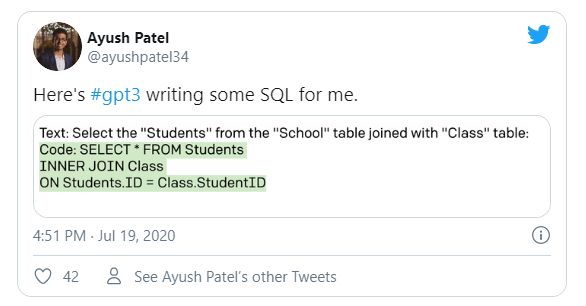
There are many other examples where developers created applications that convert natural language instruction to SQL queries, HTML, poem writing, content writing, and many more. The most amazing part is that there is no need for any fine-tuning or training of the model. Developers only have to send some sample requests to the API.
how to use gpt-3

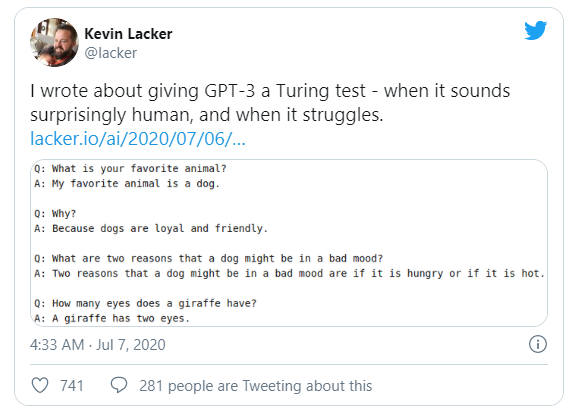
Several methods to evaluate the performance of GPT-3 were used. A few results demonstrated that, like many other AI models, GPT-3 also lacks common sense and can be fooled to generate incredibly biased text.
GPT-3 Model

GPT-3 is a great milestone in the artificial intelligence community, but the hype for GPT-3 is way too high. OpenAI’s co-founder Sam Altman commented.

The GPT-3 hype is way too much. It’s impressive (thanks for the nice compliments!) but it still has serious weaknesses and sometimes makes very silly mistakes. AI is going to change the world, but GPT-3 is just a very early glimpse. We have a lot still to figure out

GPT-3 Machine Learning Model

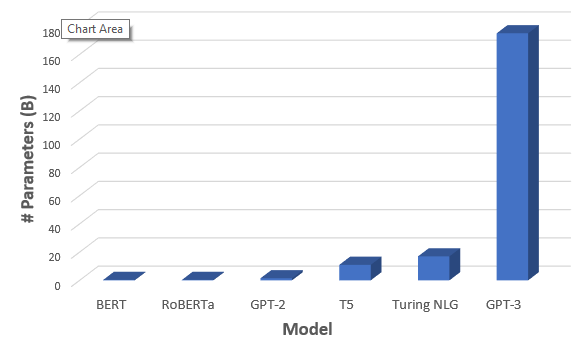
GPT-3 is trained on a massive dataset that covers almost the entire web with 500B tokens and 175 billion parameters. Compared to its previous version, it is 100x larger as well. It is a deep neural network model for language generation that is trained in such a way that it checks for the probability of a word existing in a sentence. For example, in the sentence “My father was a queen” , the word queen in this context is less probable than king in “My father was a king”. Thus by training this big neural network with almost all sorts of data from common crawl and Wikipedia, OpenAI made the GPT-3 model better than other models.

GPT-3 is actually not a novel architecture. It also uses transformers neural networks like popular language models like BERT and GPT-2. It performs much better than its predecessors, as it has been trained on a large amount of data, with extremely large model architecture and 175 billion parameters. As I said before, with this many parameters and lots of data, GPT-3 can do any NLP task like summarization, creating codes from text, writing poems, etc., without even training or fine-tuning. This is what makes GPT-3 so special. The model is not yet released, but an API is available upon request.
GPT-3 model by OpenAI
Parameters comparison of GPT-3

GPT-3, when evaluated using zero-shot and one-shot learning, shows promising performance. With few-shot training, it occasionally surpassed state-of-the-art models in the respective NLP tasks.

Getting started with GPT-3 model

Following are the steps involved in getting started with GPT-3.

  1. Get API token from OpenAI
  2. Clone the repo
  3. install openai
  4. Import modules, setup API token
  5. Add examples
  6. Submitting input

Get the API token from OpenAI

Open AI offers free access to the API through mid-August for private beta. They’re also kicking off an academic access program to let researchers build and experiment with the API. They will start with an initial set of academic researchers and collaborators who will gain free access to the API. To get the API, GO HERE and request an API, and hopefully, OpenAPI will get back to you with the access token.

How to download or install GPT-3

Clone repositoryDownload the gpt.py file from this repository and save it in your local machine. Thanks to Shreyashankar for her amazing repository.

Install OpenAI

pip install openai

pip install openai

Import modules and setup API token

Here, we imported the required libraries. Then we setup the api_key from the access token we get from OpenAI. Now with the gpt file we downloaded before we imported two modules GPT which is used to initialize the API with parameters and Example is used to prime the data with example types.

import json
import openai
from gpt import GPT
from gpt import Example

openai.api_key = data["API_KEY"]


with open('GPT_SECRET_KEY.json') as f:
    data = json.load(f)

gpt = GPT(engine="davinci",
          temperature=0.5,
          max_tokens=100)

Add examples

Here we are trying to convert the natural language to SQL with the help of very few examples.

gpt.add_example(Example('Fetch unique values of DEPARTMENT from Worker table.', 
                        'Select distinct DEPARTMENT from Worker;'))

gpt.add_example(Example('Print the first three characters of FIRST_NAME from Worker table.', 
                        'Select substring(FIRST_NAME,1,3) from Worker;'))

Submit input and get output.

Here we sent an input as ordinary text with submit_request and got the response.

## Example - 1
prompt = "Display the lowest salary from the Worker table."
output = gpt.submit_request(prompt)
print(output.choices[0].text)

## Example 2
prompt = "Tell me the count of employees working in the department HR."
print(gpt.get_top_reply(prompt))

Done ! Awesome right?

As I already mentioned, GPT-3 scraped almost every text data on the internet. This enabled the researchers to identify how different sentiments like sexism and racism play a role in real-world conversation. For example, the word ‘man’ can be found to have close relationships with words like strong, brave, etc., since they co-occurred more with these words when compared with the word ‘woman’.

Despite some limitations, the GPT-3 model is one of the best models for NLP tasks. Every new technology can help further mankind, and this model is just one extra step in the right direction.

Frequently Asked Questions

We have prepared a list of questions that are commonly asked. If you are unable to find the information you need, please feel free to submit your question to us. Our team of experts will respond to your query with accurate answers within 24 hours.

What exactly are GPT-3 models?

GPT-3 models are language models developed by OpenAI that use deep learning algorithms to generate human-like text. These models are trained on vast amounts of data and can generate various outputs, from completing text prompts to translating languages. GPT-3 models have gained significant attention for their ability to perform tasks such as language translation, chatbot communication, and even writing coherent articles. In summary, GPT-3 models are advanced language models that use artificial intelligence to generate human-like text, and they have a wide range of applications in various industries.

Why is GPT -3 so much better than other AI models?

GPT-3 (Generative Pre-trained Transformer 3) is considered to be better than other AI models due to its size, architecture, and training data.

  • Firstly, GPT-3 is much larger than its predecessors, with over 175 billion parameters, making it the largest language model ever created. This vast number of parameters allows GPT-3 to capture more complex language patterns and generate more human-like responses.
  • Secondly, GPT-3 uses a transformer architecture optimized for natural language processing. The transformer model employs a self-attention mechanism that allows it to focus on the most important parts of the input text and generate more coherent responses.
  • Lastly, GPT-3 has been trained on extensive data from diverse sources, including books, articles, and web pages. This vast training corpus allows GPT-3 to have a broad understanding of language, making it capable of generating high-quality text across various tasks and domains.

Overall, its large size, optimized architecture, and extensive training data make GPT-3 one of the most impressive AI models for natural language processing.

What are the important steps to build a GPT-3 powered application?

Building a GPT-3-powered application typically involves the following steps:

  1. Define the problem and requirements: Determine your application’s specific use case and requirements. Decide what kind of input and output your application needs and what tasks you want it to perform using GPT-3.
  2. Gather and prepare data: Gather and prepare the relevant data that you will need to train and fine-tune your GPT-3 model. Moreover, this may include text data from various sources, such as websites, social media, and other documents.
  3. Choose a GPT-3 API provider: Choose a provider that offers access to the GPT-3 API, such as OpenAI, and set up an account.
  4. Integrate the API: Integrate the GPT-3 API into your application by following the documentation provided by your chosen provider. In addition, this may involve using APIs or SDKs, depending on the provider.
  5. Fine-tune the GPT-3 model: Fine-tune the GPT-3 model using the data you gathered in step 2 and train it to perform the specific tasks required by your application.
  6. Test and evaluate: Test your GPT-3-powered application to ensure it performs correctly, and evaluate its performance against your defined requirements.
  7. Deploy and monitor: Deploy your application to production, and monitor its performance and usage over time. Continuously improve and update the application to ensure it remains effective and efficient.

Building a GPT-3-powered application requires advanced skills in machine learning, natural language processing, and software development. Working with a team of experienced professionals or consulting experts in these fields may be helpful.

What are the applications of GPT-3?

Some of the applications of the GPT-3 model include:

  • Chatbots: GPT-3 can be used to develop chatbots that can converse with users naturally and intelligently.
  • Content creation: GPT-3 can generate high-quality content such as articles, essays, and product descriptions.
  • Language translation: GPT-3 can be used to develop language translation tools that can accurately translate text from one language to another.
  • Personal assistants: GPT-3 can create virtual personal assistants to schedule appointments, set reminders, and answer queries.
  • Sentiment analysis: GPT-3 can analyze text sentiment, helping businesses and organizations understand customers’ feelings about their products and services.
  • Text completion: GPT-3 can be used to complete text in a way that matches the tone, style, and content of the original text, making it useful for tasks such as writing emails and reports.
  • Question answering: GPT-3 can be used to answer user questions, making it useful for educational and informational purposes.
  • Game development: GPT-3 can be used to develop games that require natural language processing, such as text-based adventure games or puzzle games.
How much does it cost to build a GPT-3 powered application?

Developing an application that utilizes GPT-3’s advanced capabilities can be expensive, depending on the app’s scope, complexity, necessary integrations, platform support, and the development team’s expertise. Additionally, using the GPT-3 API incurs a cost usually charged per request or as a monthly subscription based on usage and the API provider.

If you need a precise estimate for developing an application that includes GPT-3, please do not hesitate to contact us. Our team of experts will be happy to provide you with a thorough evaluation of the project’s requirements and expenses.

What is the time needed to develop a GPT-3 powered application?

The costs related to developing a GPT-3 application can differ depending on several factors, such as the intricacy of the language model, the amount of data storage needed for hosting, and the level of advanced features required. Projects with more intricate and advanced features usually demand more time and resources from a bigger development team, resulting in higher overall costs for development.

Written by

Raoof Naushad

A technology enthusiast with an urge to explore into vast areas of advancing technologies. Experienced in domains like Computer Vision, Natural Language Processing, Big data. Believes in open source contributions and loves to provide support to the community. Actively involved in building open-source tools related to information retrieval.

More from Raoof Naushad →